> ## Documentation Index
> Fetch the complete documentation index at: https://docs.cotool.ai/llms.txt
> Use this file to discover all available pages before exploring further.
# MITRE Coverage Mapping
> Unified detection coverage across your entire security stack
Cotool automatically maps all detections across your security tools to MITRE ATT\&CK, providing a single, consolidated view of your detection coverage.
## The Problem with Traditional MITRE Maps
Security teams typically face these challenges:
**Time-Consuming**: Manually maintaining MITRE coverage maps across multiple tools takes hours per tool
**Fragmented**: Separate maps for endpoint, SIEM, detection-as-code platforms—no unified view
**Inaccurate**: Maps quickly become outdated as detections change
## Cotool's Approach
Detections from connected tools are analyzed and mapped to relevant MITRE ATT\&CK techniques using AI:
* Analyzes detection names and descriptions
* Reviews query logic and detection body
* Considers tags and metadata
* Generates confidence scores for each mapping
All detections are aggregated into a single MITRE matrix showing coverage across your entire stack
The classification job runs weekly to keep the map current as detections are added or modified
## Viewing Your Coverage Map
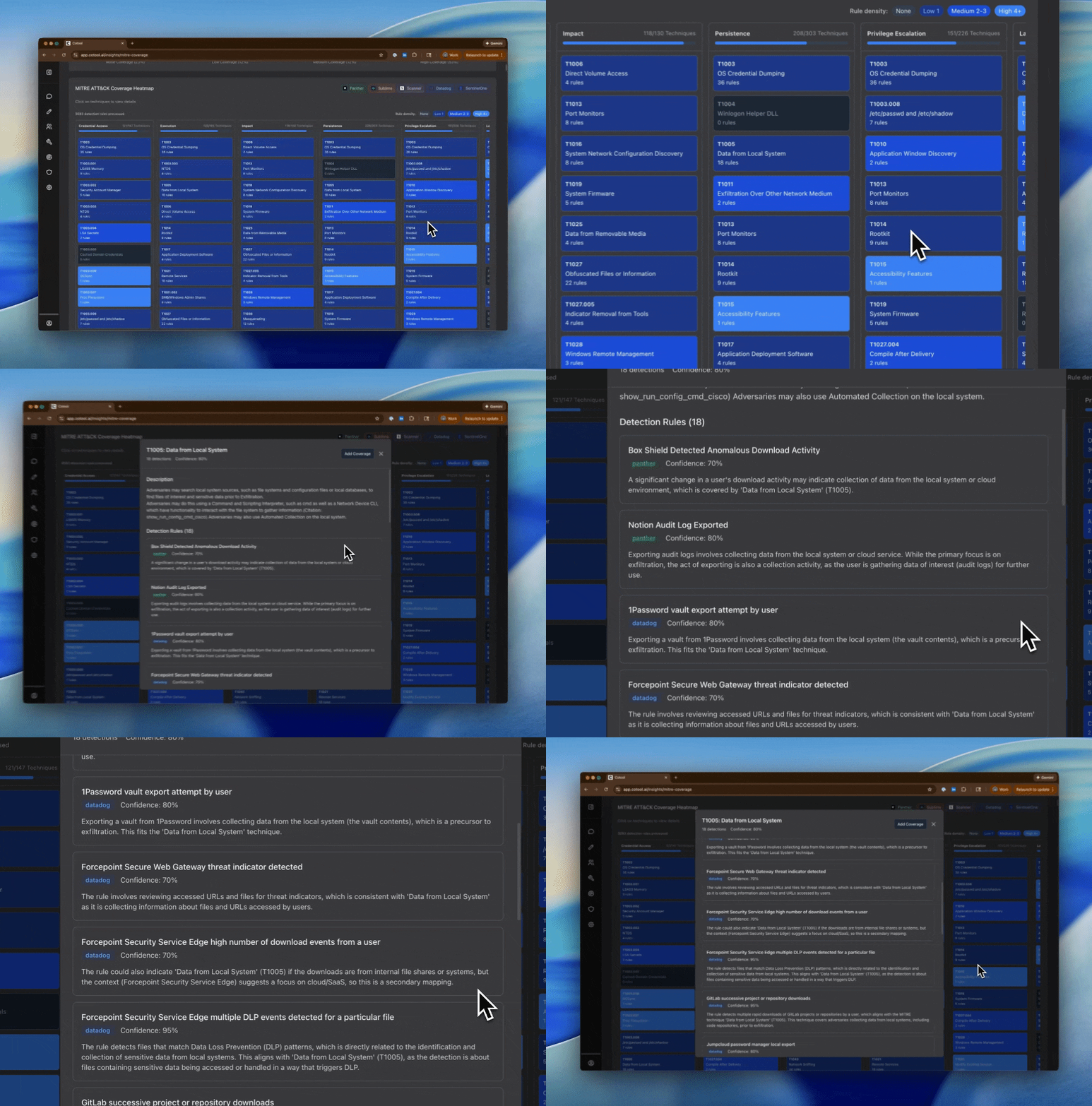
Navigate to **Detections > Coverage Map** to see:
 {/* #Test Comment */}
### Map Features
The MITRE coverage map shows:
**Detection Density**: Visualize how many detections cover each MITRE technique
* Color-coded heatmap showing coverage levels
* Click any technique to see which detections cover it
**Tool Breakdown**: See which platform each detection comes from:
* Splunk, Datadog, Scanner, Elastic (SIEM/query-based)
* SentinelOne (Endpoint)
* Panther, Sublime (Detection-as-Code)
**Confidence Scores**: Each technique mapping includes a confidence score (0-1) indicating how strongly the detection relates to that technique
**Tactic Grouping**: View coverage organized by MITRE tactics (Initial Access, Execution, Persistence, etc.)
## Understanding Coverage Details
Click on any MITRE technique to see:
All detections covering this technique, showing:
* Detection name
* Source platform (Splunk, Panther, SentinelOne, etc.)
* Confidence score for the mapping
* Reasoning for why it maps to this technique
Example:
```
T1053.005 - Scheduled Task/Job: Scheduled Task
├── SentinelOne (2 detections)
│ ├── "Suspicious Scheduled Task Creation" (confidence: 0.92)
│ └── "SchTasks.exe Command Line" (confidence: 0.88)
│
└── Splunk (1 detection)
└── "Windows Scheduled Task Created" (confidence: 0.85)
```
For each detection, see:
* **Platform**: Where this detection runs
* **Description**: What the detection monitors
* **Confidence**: How strongly it relates to this technique
* **Classification Reasoning**: Why Cotool mapped it to this technique
* **Last Updated**: When the classification was performed
A single detection may map to multiple MITRE techniques if it covers multiple attack patterns. Each mapping has its own confidence score.
## How the Classification Works
The MITRE classification job runs weekly and:
1. **Fetches detections** from all connected platforms
2. **Analyzes each detection** using Cotool to understand what it detects
3. **Maps to techniques** with confidence scores (0-1 scale)
4. **Validates mappings** against the official MITRE ATT\&CK framework
5. **Stores results** for visualization in the coverage map
Cotool considers:
* Detection names and descriptions
* Query/rule logic and body content
* Tags and metadata (including platform-provided MITRE mappings like SentinelOne's)
* Severity levels and rule types
## Frequently Asked Questions
Cotool uses AI to analyze each detection's name, description, query logic, and metadata. Cotool generates mappings to relevant MITRE techniques with confidence scores. For platforms like SentinelOne that provide their own MITRE mappings, Cotool can use those provider-supplied mappings directly.
The MITRE classification job runs automatically once per week (Sunday at midnight). You can also trigger it manually if you've added many new detections and want an immediate update.
The classification job is idempotent—it skips detections that have already been classified. Only net-new detections are analyzed and mapped. This makes the weekly job efficient.
Currently, mappings are generated automatically by Cotool. If you believe a mapping is incorrect, you may want to improve the detection's description or metadata to help Cotool classify it more accurately.
{/* #Test Comment */}
### Map Features
The MITRE coverage map shows:
**Detection Density**: Visualize how many detections cover each MITRE technique
* Color-coded heatmap showing coverage levels
* Click any technique to see which detections cover it
**Tool Breakdown**: See which platform each detection comes from:
* Splunk, Datadog, Scanner, Elastic (SIEM/query-based)
* SentinelOne (Endpoint)
* Panther, Sublime (Detection-as-Code)
**Confidence Scores**: Each technique mapping includes a confidence score (0-1) indicating how strongly the detection relates to that technique
**Tactic Grouping**: View coverage organized by MITRE tactics (Initial Access, Execution, Persistence, etc.)
## Understanding Coverage Details
Click on any MITRE technique to see:
All detections covering this technique, showing:
* Detection name
* Source platform (Splunk, Panther, SentinelOne, etc.)
* Confidence score for the mapping
* Reasoning for why it maps to this technique
Example:
```
T1053.005 - Scheduled Task/Job: Scheduled Task
├── SentinelOne (2 detections)
│ ├── "Suspicious Scheduled Task Creation" (confidence: 0.92)
│ └── "SchTasks.exe Command Line" (confidence: 0.88)
│
└── Splunk (1 detection)
└── "Windows Scheduled Task Created" (confidence: 0.85)
```
For each detection, see:
* **Platform**: Where this detection runs
* **Description**: What the detection monitors
* **Confidence**: How strongly it relates to this technique
* **Classification Reasoning**: Why Cotool mapped it to this technique
* **Last Updated**: When the classification was performed
A single detection may map to multiple MITRE techniques if it covers multiple attack patterns. Each mapping has its own confidence score.
## How the Classification Works
The MITRE classification job runs weekly and:
1. **Fetches detections** from all connected platforms
2. **Analyzes each detection** using Cotool to understand what it detects
3. **Maps to techniques** with confidence scores (0-1 scale)
4. **Validates mappings** against the official MITRE ATT\&CK framework
5. **Stores results** for visualization in the coverage map
Cotool considers:
* Detection names and descriptions
* Query/rule logic and body content
* Tags and metadata (including platform-provided MITRE mappings like SentinelOne's)
* Severity levels and rule types
## Frequently Asked Questions
Cotool uses AI to analyze each detection's name, description, query logic, and metadata. Cotool generates mappings to relevant MITRE techniques with confidence scores. For platforms like SentinelOne that provide their own MITRE mappings, Cotool can use those provider-supplied mappings directly.
The MITRE classification job runs automatically once per week (Sunday at midnight). You can also trigger it manually if you've added many new detections and want an immediate update.
The classification job is idempotent—it skips detections that have already been classified. Only net-new detections are analyzed and mapped. This makes the weekly job efficient.
Currently, mappings are generated automatically by Cotool. If you believe a mapping is incorrect, you may want to improve the detection's description or metadata to help Cotool classify it more accurately.